

Appearance
Collab Detection
Never miss a brand deal again.
Brand offers get buried. A creator's inbox is mostly fans, requests and hellos, and the message proposing a paid partnership looks exactly like all of them until you open it. Miss it for a week and the brand has moved on to someone who replied.
Collab Detection reads every incoming DM and asks one question: is this a brand, agency or PR firm proposing a collaboration? If the answer is yes, the message is saved to Brand Collabs with the brand's name and whatever they offered. If the answer is no, the message is read and forgotten.
📸 Screenshot
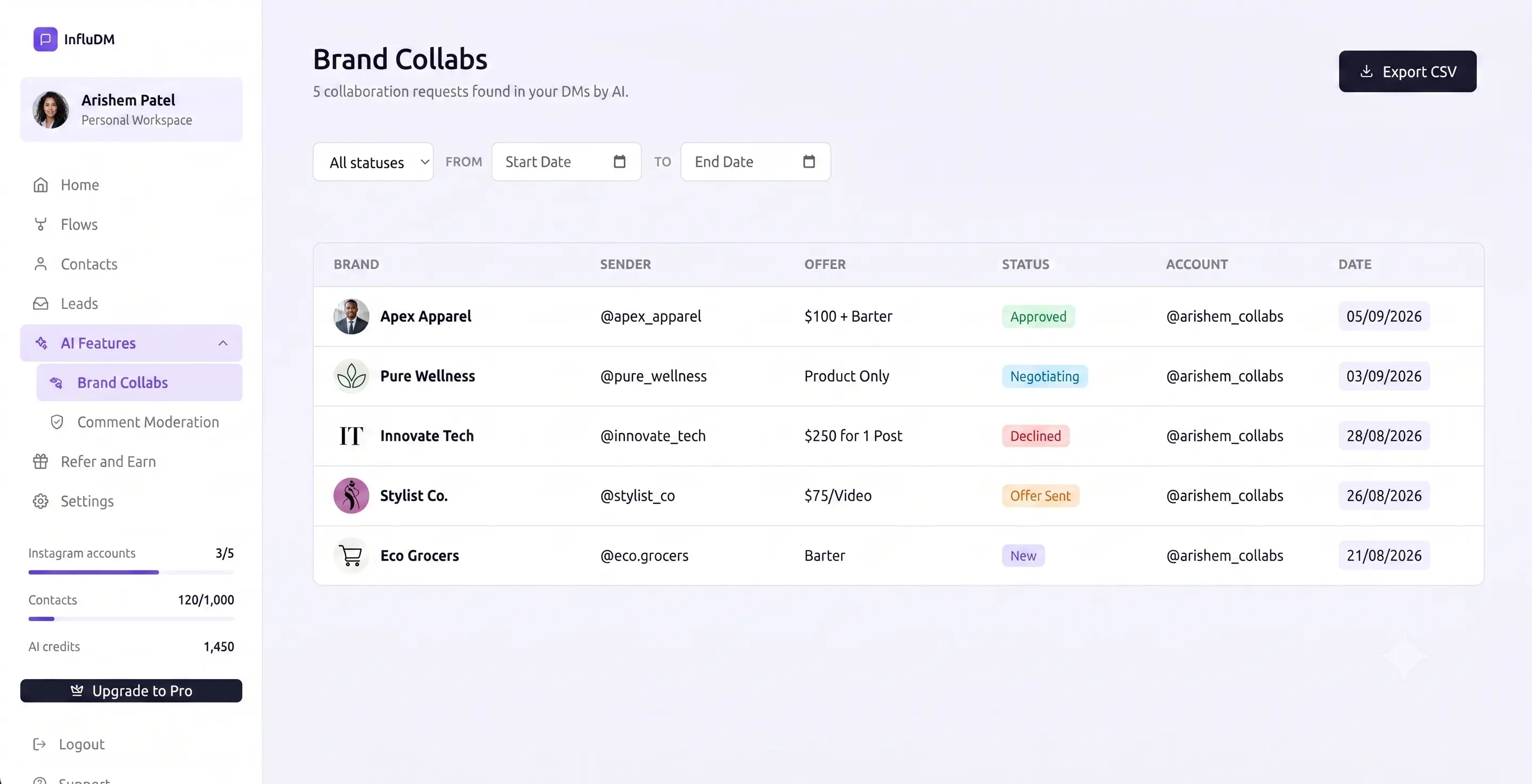 The Brand Collabs page with several rows, showing brand name, sender, offer amount and status columns.
What counts as a collab request
It keeps genuine outreach of every shape:
- Sponsorships and paid partnerships
- Barter and gifting deals — free product in exchange for content
- Affiliate and commission offers
- Product seeding
- Long-term ambassadorships
- A first approach that mentions no numbers at all — a short "hey, collab?" is enough to be saved
What it ignores
- Fans, compliments and questions
- Story replies and reactions
- People asking you to promote them for free
- Anyone selling you something
That last distinction is the useful one, and it's the one a keyword filter always gets wrong. "We'd love to send you our new product" is an offer worth your time. "I can grow your followers to 100k" is a sales pitch. Both mention your account and a benefit; only one is a deal.
It works on a single vague message
You don't need the brand to spell out terms. "We want to do barter collabs with you" has no amount, no brand name and no attachment — and it is still saved as a barter offer, with the brand identified from their Instagram username.
The Brand Collabs page
Offers land in AI Features → Brand Collabs, laid out like Leads so it works the same way you already know.
Each row shows the brand, who sent it, what they offered, where it stands and when it arrived. New offers are highlighted, and opening the page marks them as read — you don't have to tick anything off.
Filtering and exporting
Filter by Instagram account, status, or a date range. Export CSV downloads exactly what the current filters show, so narrow the list first and you get a clean file rather than everything you've ever received.
📸 Screenshot
The filter bar above the Brand Collabs table — status and a From/To date range — with the Export CSV button at the top right.
Working a deal
Click any row to open it. The detail panel shows the original message exactly as the brand sent it, plus everything you need to track what you did about it.
| Field | What it's for |
|---|---|
| Status | New, Replied, Accepted or Declined — how far the conversation has got. |
| Offer | What they're paying. Editable, in case the AI read an amount differently to you. |
| Contact email and phone | So the deal isn't trapped inside Instagram DMs. |
| Notes | Anything you want to remember — deliverables, deadlines, who you spoke to. |
Open in Instagram takes you straight to that person's DM thread, so you can reply without hunting for the conversation.
📸 Screenshot
Click any row — brand, sender, offer, status — to open the detail panel with the original message and the status, offer, contact and notes fields.
Reading the Offer column
The AI pulls the money out of the message and normalises it, so the column is scannable and sortable rather than a wall of different phrasings.
| Shown | Means |
|---|---|
| An amount | They named a fee. Displayed in your workspace's currency. |
| Barter | Free product, gifting or affiliate-only — a real offer, but not a cash one. |
| Not mentioned | A genuine approach that hasn't named terms yet. Often the most valuable kind — they're waiting for you to open the conversation. |
The detail panel also shows the offer as the brand originally worded it. Give that a glance before you commit to a number: if a brand quoted $500 and your workspace displays rupees, the column shows the figure in your currency symbol without converting it. The original wording is how you catch that.
Editing the offer
If the AI read "20k for 3 reels" as 20,000 and you read it as 60,000, you're right — change it. The stored amount is what sorts and exports, so correcting it keeps your reporting honest. The brand's original wording is kept either way.
What you're not charged for
Replies your flows are already handling — answers to a lead form question, taps on your opening message — never reach the AI at all. Those are your own automation talking, so they cost nothing.
Every other incoming DM is read, including follow-ups in a conversation that's already going. Brands routinely open with a plain "hi" and only mention the deal in their next message, so reading only the first message of a thread would lose exactly the offers you care about.
Troubleshooting
A brand DM didn't show up. Three possibilities, in order of likelihood:
- It wasn't read as a collaboration offer. Someone praising your work and mentioning their brand isn't proposing anything.
- It was a reply your flow was already handling, which is skipped on purpose.
- Your credit balance hit zero — reading stops there.
The brand name looks wrong. When a message doesn't name the company, the Instagram username is used instead. Edit the row if you know the real name.
Nothing is being detected at all. Check the feature is switched on, that the Instagram account is in its list, and that you have credits. See AI Features.
Still stuck? Try the chat on this page first, then Contact & Support.