

Appearance
Response Steps
The Response Flow card is the sequence InfluDM sends once the person engages. Steps run in order, top to bottom, one message at a time.
A flow can have up to 10 steps. Add one with Add Response and pick a type.
Step types at a glance
| Type | Sends | Buttons | Pauses the flow |
|---|---|---|---|
| Text message | A plain message | Yes | No |
| Card message | Image + title + subtitle | Yes | No |
| Image message | One or more images | No | No |
| Ask to follow | A card with two buttons | Added for you | Yes — until they follow |
| Lead form | A saved form's questions | No | Yes — until answered |
Buttons are a bonus, never the only way through
Instagram doesn't show buttons, cards or quick replies on desktop — someone reading your DM on instagram.com sees the text but no tappable controls.
Every step that waits for an answer therefore also accepts a typed reply. Whatever they send counts, so a conversation never dead-ends because of where the person happens to be reading it. It's still worth writing your prompts so they read naturally to someone who has to type, e.g. "Reply DONE once you've followed."
Text message
A plain message, optionally with link buttons.
Each button needs a label and a URL. The buttons are written into the message as labelled links, so they arrive as tappable links on every device — phone, tablet and desktop alike:
Here's your free guide 🎉

Download it: https://example.com/guide
Use it for the main body of your reply, and for the step that hands over the link.
Card message
A rich card: a hero image, a title, a subtitle and link buttons.
The title is required. Cards are the best-looking way to deliver an offer — image, one-line pitch, and a Get it now button.
Upload the image from the editor. Images must be JPEG, PNG or GIF and 8 MB or smaller — Instagram's own limit. Anything larger is rejected when you upload it, not later when someone is waiting on the message.
Image message
Up to 10 images, each sent as its own message, one after another. Same format and size rules as the card image.
Image steps can't carry buttons — add a text or card step after them if you need a link.
Use it for carousels of proof, before/afters, or a multi-page freebie preview.
Ask to follow
A gate. The flow stops here and only continues once Instagram confirms the person follows the connected account — so nothing you're giving away goes out to a non-follower.
There's no cap on how many people this can run for. Every person who reaches the gate is checked, on every plan.
It always runs first, ahead of every other step, and the builder keeps it there. A gate placed after your link would be guarding nothing. A flow can have only one.
It also needs an Opening Message on comment and live flows: the gate waits for a reply, and only a tapped Opening Message opens the window that lets one through.
Three fields:
- Message — the ask. Defaults to Please follow to continue.
- Confirm button label — keep it short. Defaults to I am following.
- Re-ask message — the one reminder sent to someone who isn't following yet, e.g. "Hmm, we can't see your follow yet — follow us and reply here and I'll send it over!"
📸 Screenshot
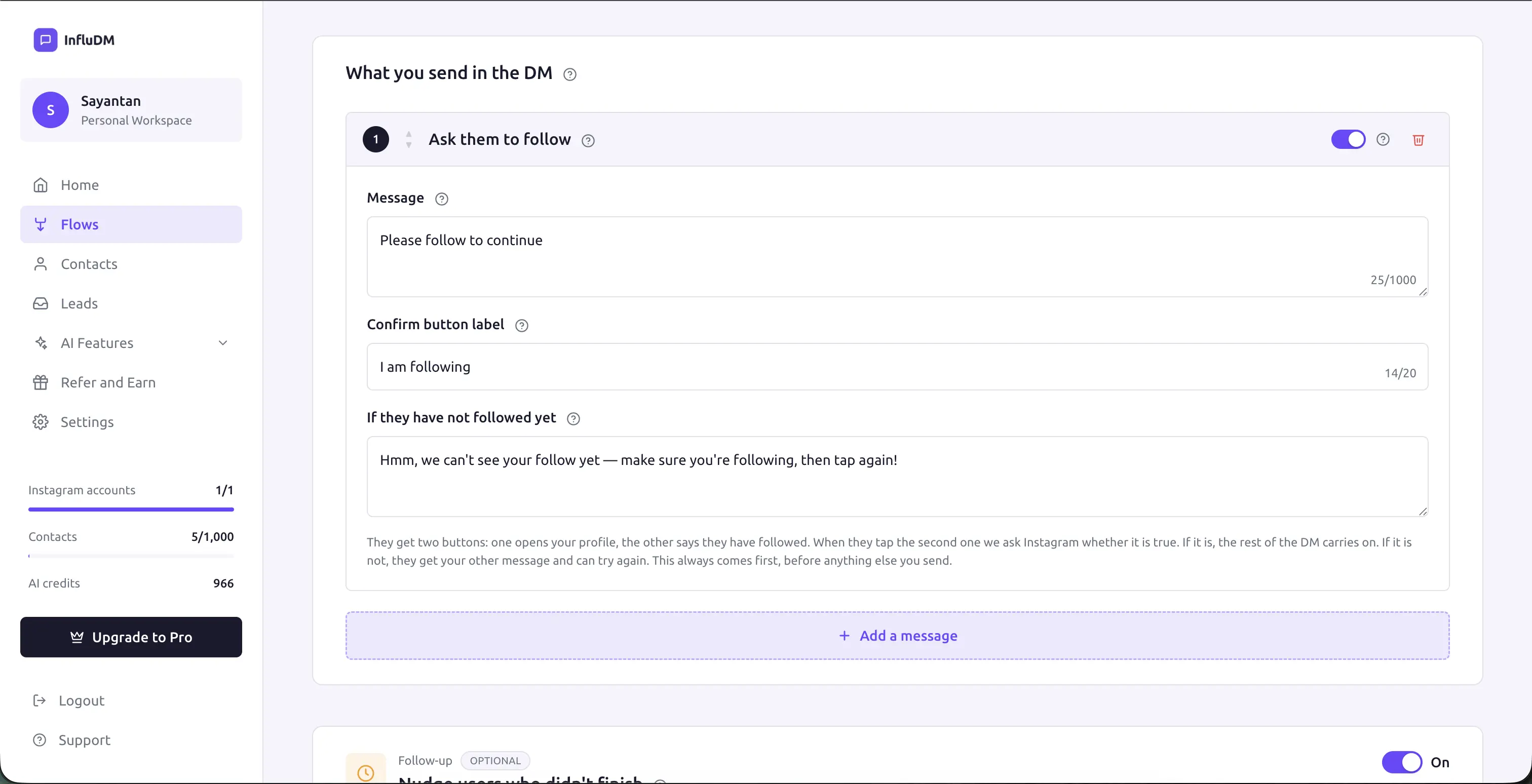 The Ask to follow step expanded in the builder, showing the message, confirm button label and re-ask message fields.
Existing followers skip it entirely
Before the gate sends anything, InfluDM checks whether the person already follows you. If they do, the gate is skipped silently and the flow moves straight to the next step.
They never see the ask at all — which is the right outcome. The gate exists to earn a follow, and there's none left to earn from someone who followed you months ago. Asking anyway is friction charged to your most loyal audience.
What the gate sends
A card with two buttons:
- Visit profile — opens your Instagram profile so they can follow without leaving the conversation to search for you. Added automatically and pointed at the connected account; there's nothing to configure.
- Your confirm button — the one they tap to say they've followed.
📸 Screenshot
The builder explains what the gate sends: two buttons, one opening your profile and one confirming the follow, with the re-ask message for anyone who hasn't.
How the check works
When they tap confirm — or simply type a reply — InfluDM asks Instagram whether that user follows you, live, at that moment. Nothing stored earlier is used.
- Following — the flow continues from the next step, immediately.
- Not following — the re-ask goes back once, and the conversation waits.
That "once" matters. The check still runs on everything they send afterwards, so someone who follows on their fourth message is let through on their fourth message. But the reminder itself is sent a single time. Repeating the same card at someone who is already reading it is how an account gets reported as spam, and the card with the way through is still sitting in the thread either way.
A real follow can take a moment to register
A follow made seconds earlier occasionally isn't visible to Instagram's API yet, so an honest confirmation can land on the re-ask. Following through and replying again resolves it — and because the check runs every time, they don't need another prompt from you.
If someone never follows, the conversation is quietly settled after a couple of days rather than sitting open forever. Nothing further is sent to them.
Lead form
Asks the questions from a saved lead form, one at a time, and stores the answers in Leads.
Pick a form from the dropdown. Forms are created in Settings → Lead forms and can be reused across many flows.
What the person sees:
- One question per message, in order.
- Email and phone questions carry a native quick reply that pre-fills the address or number they have on file with Instagram.
- Optional questions carry a Skip button. Required questions don't — in a DM thread there's no other way to say "you may leave this blank".
- An answer that clearly isn't an email or phone number gets one polite re-ask. After that the answer is accepted as typed, so nobody is trapped in a validation loop.
When the last question is answered, the submission is saved and the flow continues from the next step.
Ordering, disabling and deleting
Each step has controls to:
- Move up / down — reorder the sequence.
- Disable — keep the step in the flow but skip it at send time. Handy for temporarily pulling a link without losing the copy. Disabled steps are also skipped by validation.
- Delete — remove it.
A good default sequence
For a comment-triggered freebie flow:
- Text — "Here it is! 🎉" — a warm confirmation so they know it worked.
- Ask to follow — the gate, now that they're invested enough to bother.
- Lead form — name and email, while they're still engaged.
- Card — the offer image with a Download now button.
The ordering is doing real work here. The gate sits after the confirmation because someone who has already received a friendly message is far more likely to follow than someone met with a demand as the first thing you say. The lead form sits after the gate because a follower is a warmer audience for a form than a stranger. And the payload comes last, because everything before it is what you traded for.
Where to go next
- Opening Message — the message that earns the first tap.
- Lead Forms — building the forms these steps ask.
- Follow-ups — one nudge for people who stall at a gate.
- How a Flow Runs — what happens between steps.